Lunch League
How it works
Four things happen on their own. Here is all of it, in order.
Your games arrive
Pick your team, once
The league publishes playoff weeks before it knows who is playing whom. Waiting for the game to be scheduled would put it on your calendar days late, so a placeholder goes on now and is replaced when the real one appears — the same entry updated, never a second copy.
A rescheduled game does the same thing. You are never asked to delete anything.
You can’t make one
On your own page, on the day
The same card is on the front page and inside the app, and it is the only place an answer is given. Nothing is texted to anybody and there is no form to fill in.
Your captain’s list updates on the spot. A captain can also answer for you — if somebody tells them at the rink — and when they do, you are told, so an answer never changes underneath you without your knowing.
Unless your captain has turned it off. It is on by default, and a captain who does not want it ticks one box: nobody is then invited and nothing is confirmed — instead they get one email with the whole list of who is missing, with ranks and positions, and they take it from there.
Either way it only ever asks people the league’s own rules allow: at or below the rank of whoever dropped out, never stronger.
Who gets asked, and when
Each tier gets a third of the time that was left when the hole appeared — not a third of the time left now, which shrinks every hour and would collapse the later tiers into nothing.
A gap found eight days out gives Tier 1 the first ~2.7 days. One found on the morning of the game gives everybody the whole list immediately.
Same rank as the player who is missing. A rank 6 hole is offered to rank 6 players. Goalies get more passes — one rank below, then every lower rank — and only when every one of those has been asked without success, one rank above, with a league administrator’s approval and the opposing captain copied. Two ranks above is never allowed.
The positions the captain chose. A defence opening asks D, DF and E players; a forward opening asks F, FD and E. The captain can set any player to “either”.
On the sub list for that division. Players can opt out division by division, and players who are on no roster but on the league’s sub list are asked too.
Not if they already have a game. Anybody whose own game overlaps yours, in any division, is never asked.
Not your own team-mates. They are already on the sheet.
Nobody is ever asked twice for the same game.
Somebody says yes
On the captain’s confirmations page
This needs reading. They replied by sms, but not with a plain yes or no:
Reads as conditional — offers to play, but has a 1pm commitment. A machine’s reading of the words above, and nothing more — it has changed nothing and decided nothing.
It never decides. A reply that is not a plain yes or no leaves the invitation waiting for a person, on every one of the three settings below — including the one where anybody who says yes is in. There is no arrangement in which a machine’s reading puts somebody in a line-up.
Your captain is told there is something to read, and the game shows needs reading in their list until they act on it.
The words are kept exactly as they were sent. The reading underneath is a summary of those words and is shown beneath them on purpose — a summary above the quote is the thing that gets skimmed instead of it.
A captain picks one of three. The league’s limits below are checked in all three — the setting only decides who presses the button.
1. Anyone who says yes is in. First come, first served. Nobody waits on anybody.
2. Your first-call list decides for themselves — and so does anyone inside 24 hours. Tier 1 are people the captain has already vouched for, so they need no second look; and close to a game a slower answer is worse than an imperfect one.
3. The captain confirms everyone. Nobody joins the line-up until they say so.
The third one needs the captain to act. Once enough people have volunteered the search stops — so if nobody confirms them, the game arrives with volunteers waiting and an empty sheet. Nothing confirms on a captain’s behalf today.
What the league allows
| Game | Skater subs | Of those, weaker | Goalie |
|---|---|---|---|
| Regular | 3* | 3 | 1 |
| Consolation | 3* | 3 | 1 |
| Playoff | 1 | it must be | 1 |
| Championship | none | none | 1 |
A skater substitute in a championship game is a forfeit. So the tool will not confirm one at all — not by hand, and not on any automatic setting. It refuses and says why.
A goalie substitute is still allowed. A team with no goalie cannot play at all.
Weaker means a lower rank than the player being replaced. In this league a higher number is the stronger player.
A regular game allows all three substitutes to be weaker. A playoff allows one skater substitute for the whole game, and that one must be at least one rank below the player out — so a captain chooses which absence to cover.
* The league sometimes allows four, or five — for a summer season, or a game near a holiday. When it does, the captain’s screen says so.
Somebody pulls out
It depends what was withdrawn. Taking back an offer changes a maybe into a no, so the captain gets an email and the search carries on.
Taking back a confirmation removes a name the captain believes is on the sheet — so that one also sends a text.
The captain sets the lines
Announced
Set by your captain.
Until a captain sets one, the board shows suggested lines built from the position the league publishes — and says so, because the league does not publish lines at all.
Pick somebody, then pick where they go.
Going away? Hand it to somebody
On your captain page
If you are out, you can assign a substitute “Assistant Captain” to handle subs and roster confirmations. Don’t worry — the rest of your settings do not get shared and you’ll be able to also see what goes on.
You pick which games. Tick the games you will be away for and they can confirm substitutes, read the team’s messages and write to the team — on those dates and no others. Every game this season is there as an alternative, underneath.
They are not listed as the captain anywhere, and the league’s own roster does not change. What they get is your notifications and your buttons — a substitute who says yes reaches them.
The confirm is theirs to press. Take it off the same way you put it on, and change it whenever you like — a new choice replaces the old one rather than adding to it, so ticking one more game means ticking the others again.
They can set the linesStuck? Ask the search how
Search, on every page
The Search box answers how do I…? as well as finding people, teams and posts. Type a question — “How do I mark myself out for the season and get a new teammate?” — and press Ask, or Enter.
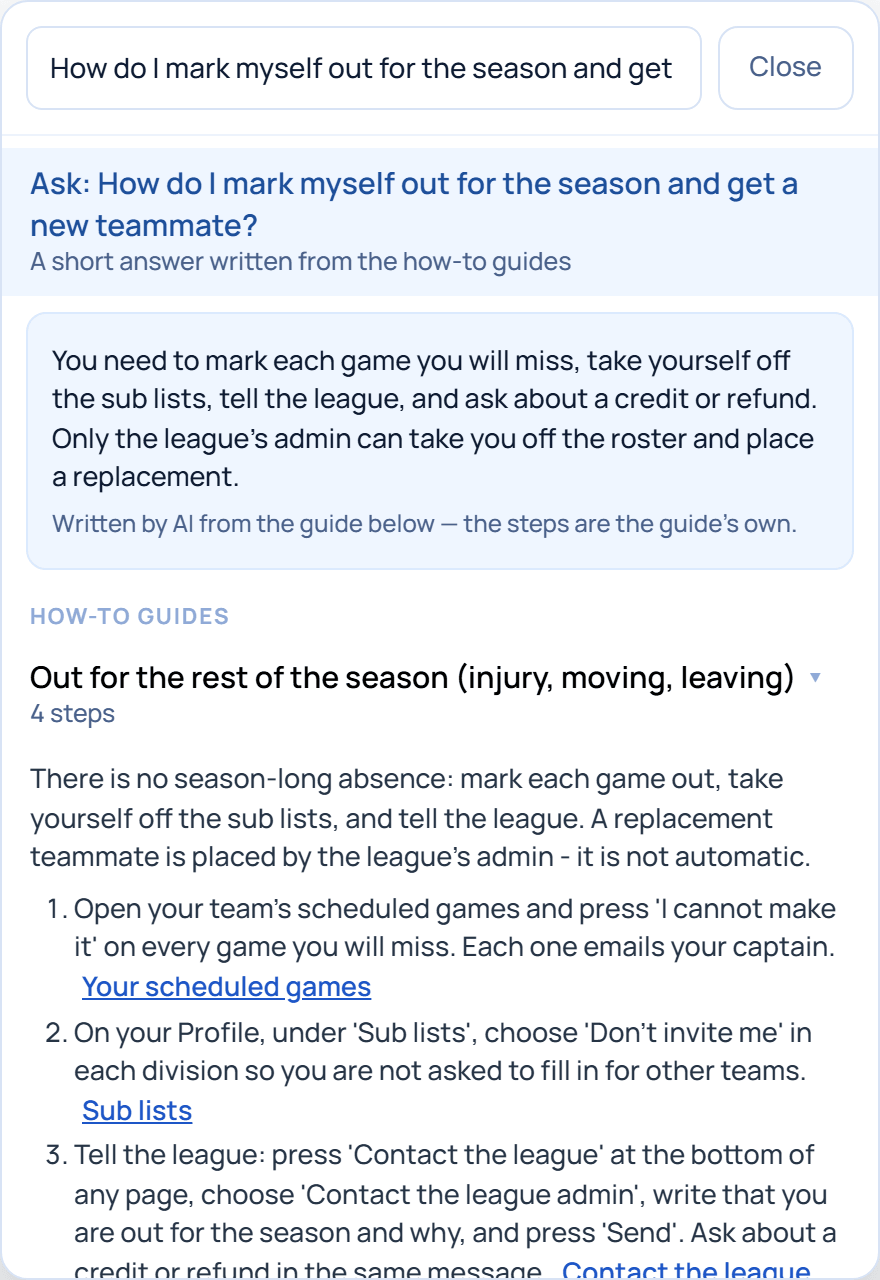
The answer is written by AI from the site’s own how-to guides and nothing else, and the steps under it are the guide’s own, each with a link to the page where it happens. When no guide covers the question it says “I don’t know” and shows the closest guides rather than guessing.
You see the guides for what you do: captains also get captains’, scorekeepers scorekeepers’, and administrators all of them. Typing never asks the AI — only Ask does, up to twenty times a day each — and nothing about you goes with the question.
Not affiliated with, or endorsed by, Lunch League.